Python Scripting Examples
This page shows practical usage examples of pyFuRNAce scripting interfaces.
Two helices with FLAPs (and optimization)
 1import pyfurnace as pf
 2from pyfurnace.generate import generate_road
 3
 4line1 = [
 5    pf.TetraLoop(),
 6    pf.Stem(7),
 7    pf.Dovetail(-2, up_cross=False),
 8    pf.Stem(6),
 9    pf.KissingDimer(),
10    pf.Stem(6),
11    pf.Dovetail(-2, up_cross=False),
12    pf.Stem(4),
13    pf.Broccoli(),
14    pf.Stem(4),
15    pf.TetraLoop(True),
16]
17
18line2 = [
19    pf.TetraLoop(),
20    pf.Stem(7),
21    pf.Dovetail(-2, down_cross=False),
22    pf.Stem(10),
23    pf.start_end_stem(),
24    pf.Stem(10),
25    pf.Dovetail(-2, down_cross=False),
26    pf.Stem(7),
27    pf.TetraLoop(True),
28]
29
30origami = pf.Origami(line1, line2, aling="center")
31
32print(origami)
33print(origami.structure)
34print(origami.sequence)
35
36### Optimization
37constraints = origami.sequence
38constraints = "GGGA" + constraints[4:]
39
40sequence = generate_road(
41    origami.structure, sequence=constraints, pseudoknots=origami.pseudoknots
42)
43
44origami.sequence = sequence
45print(origami)
46origami.save_3d_model("basic_origami")
47origami.save_fasta("basic_origami")
RNA filament
 1import pyfurnace as pf
 2
 3# MAKE A SIMPLE TILE AND CLEANUP
 4origami = pf.simple_origami(
 5    dt_list=[120],
 6    kl_columns=1,
 7    main_stem=[22],
 8    add_terminal_helix=True,
 9    align="first",
10    use_angles=True,
11)
12
13# Adjust the length of the stems with Tetraloops
14origami[(1, 7)].length = 5
15origami[(1, 1)].length = 5
16
17# Adjust the length of the stems with external KL
18origami[(0, 7)].length = 7
19origami[(2, 7)].length = 8
20origami[(2, 1)].length = 6
21origami[(0, 1)].length = 7
22
23# Replace the tetraloops with kissing loops in the first and last helix
24origami[(0, 0)] = pf.KissingLoop180(open_left=False, pk_index="1")
25origami[(2, 0)] = pf.KissingLoop180(open_left=False, pk_index="2")
26origami[(0, 8)] = pf.KissingLoop180(open_left=True, pk_index="2'")
27origami[(2, 8)] = pf.KissingLoop180(open_left=True, pk_index="1'")
28
29# Make three tiles
30tile = origami.copy()
31n_tiles = 3
32
33for i in range(n_tiles - 1):
34    # add and empty line, it will be filled when
35    # the columns are repeated
36    origami.append([])
37
38    # add the tile to the origami
39    for line in tile:
40        origami.append(line, copy=True)
41
42
43# REPEATE THE COLUMNS
44n_columns = 2
45
46# This is gonna be the basic column
47column = origami.copy()
48for col_ind in range(1, n_columns):
49
50    # add two empty lines, it will be filled when
51    # the columns are repeated
52    origami.append([])
53    origami.append([])
54
55    # # add the column to the origami
56    for line_ind, line in enumerate(column):
57        line_index = line_ind + 2 * col_ind
58        insert_at = (line_index, len(origami[line_index]))
59        origami.insert(insert_at, line)
60
61
62# Join adjacent 180 KL to kissing dimers
63for y, line in enumerate(origami):
64
65    # go through the line in reverse order
66    for i in range(len(line) - 1, 0, -1):
67
68        # if the two adjacent motifs are kissing loops
69        # pop the one and replace the other with a kissing dimer
70        if isinstance(line[i], pf.KL180) and isinstance(line[i - 1], pf.KL180):
71            origami.pop((y, i))
72            origami[y, i - 1] = pf.KissingDimer()
Folding barrier optimization
A simple folding barrier optimisation is provided in pyFuRNAce, and involves changing the 5′ start position of the structure (see PyFuRNAce folding barrier estimation for details).
It can be accessed via the improve_folding_pathway method of the Origami class:
import pyfurnace as pf
origami = pf.Origami()
RENDER_TARGET = origami
origami.append([]) # Add empty line
origami = pf.simple_origami(dt_list=[120, 120, 120],
                            kl_columns=3,
                            main_stem=33,
                            use_angles=True) # Create a simple origami

origami = origami.improve_folding_pathway(kl_delay=150)
Or it can be accessed via the Folding Barrier view of the graphical user interface.
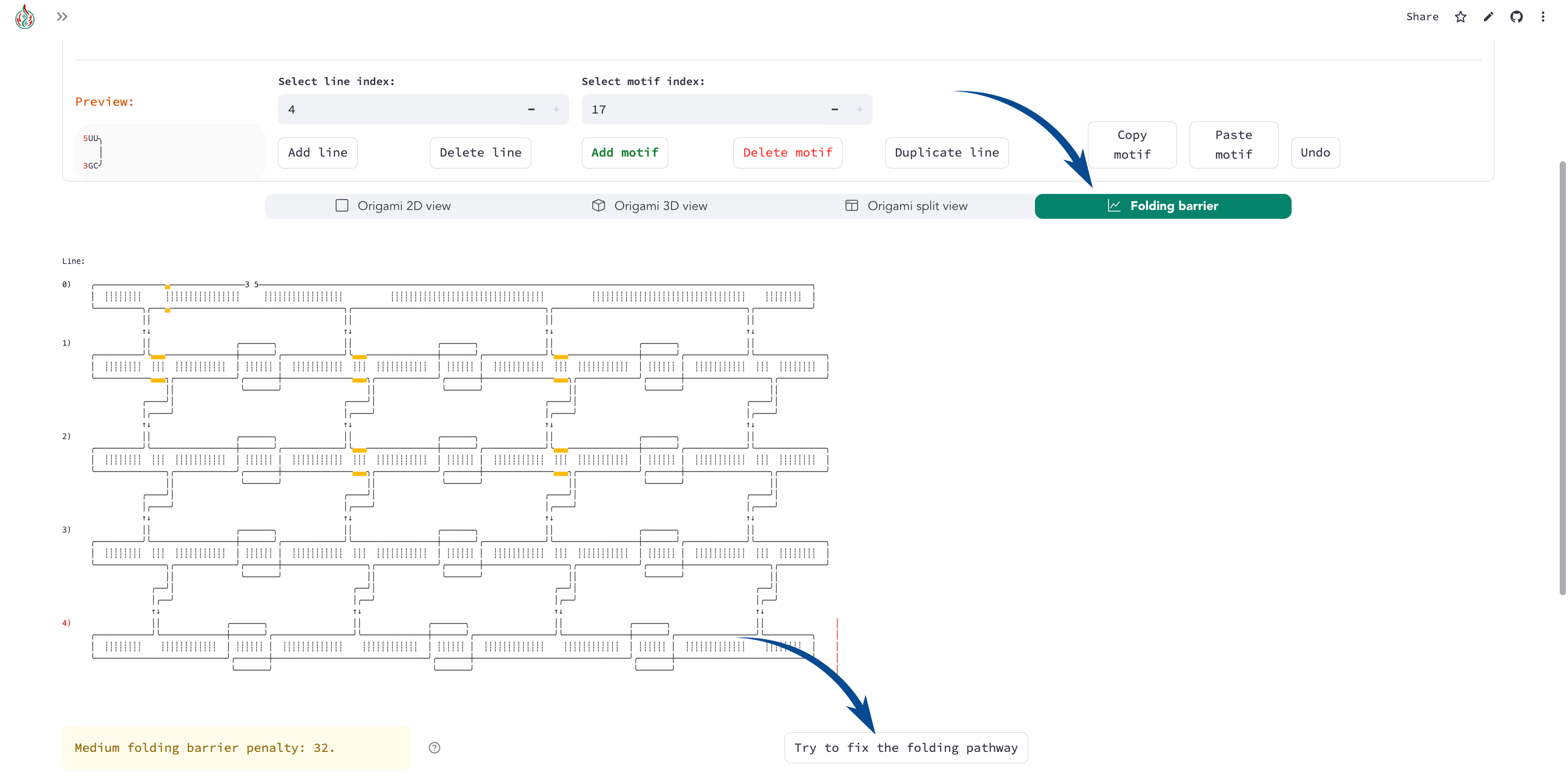
For a full folding barrier optimization example, see:
Full optimisation
  1from itertools import product
  2import pyfurnace as pf
  3
  4### ORIGAMI PARAMETERS
  5dovetails_list = [-3, -3]
  6kl_columns = 3
  7kl_delay = 150  # nucleotides delay to claculate the folding barrier
  8
  9# collection of best configurations
 10# a configuration is a tuple of the form (stem_pos, best_start_position)
 11best_confs = []
 12total_min = float("inf")
 13n_helix = len(dovetails_list) + 2
 14
 15starts = list(product(range(0, n_helix), repeat=kl_columns))[::-1]
 16
 17### Find the best start position
 18for stem_pos in starts:
 19
 20    ### Usually the central helices are not a good start position (heuristic)
 21    # Avoiding central helices screens out a lot of configurations, so
 22    # uncomment the next lines if you want to test them
 23
 24    ### FILTERING OUT CENTRAL HELICES
 25    # skip = False
 26    # for h in range(3, n_helix - 3):
 27    #     if h in stem_pos:
 28    #         skip = True
 29    #         break
 30    # if skip:
 31    #     continue
 32    ### END OF FILTERING
 33
 34    print("Stem pos:", stem_pos)
 35
 36    # Create the origami with the given stem positions
 37    # and no start/end stem
 38    origami = pf.simple_origami(
 39        dovetails_list,
 40        kl_columns=kl_columns,
 41        main_stem=33,
 42        stem_pos=stem_pos,
 43        align="first",
 44        add_start_end=False,
 45    )
 46
 47    start_barrier = origami.assembled.folding_barriers(kl_delay=kl_delay)[1]
 48    print("Start barrier:", start_barrier)
 49
 50    db, stacks = pf.dot_bracket_to_stacks(origami.structure)
 51    min = start_barrier
 52    best_middle = 0
 53    for db, (start, end) in zip(db, stacks):
 54        if db not in "()":
 55            continue
 56        pos = (start + end) // 2
 57        new_strucutre = pf.rotate_dot_bracket(origami.structure, pos)
 58        new_bar = pf.folding_barriers(structure=new_strucutre, kl_delay=kl_delay)[1]
 59        if new_bar < min:
 60            min = new_bar
 61            best_middle = pos
 62            best_structure = new_strucutre
 63        if new_bar < total_min:
 64            total_min = new_bar
 65            best_confs = [(stem_pos, pos)]
 66        elif new_bar == total_min:
 67            best_confs.append((stem_pos, pos))
 68
 69    print("Best start:", best_middle, "Barrier:", min)
 70
 71    print()
 72
 73print("Best min penalty:", total_min)
 74print("Best confs:")
 75for conf in best_confs:
 76    print("Main stem positions:", conf[0], "Best start position:", conf[1])
 77
 78# Make the origami with the best configuration
 79best_stem_pos = best_confs[0][0]
 80best_start_pos = best_confs[0][1]
 81origami = pf.simple_origami(
 82    dovetails_list,
 83    kl_columns=kl_columns,
 84    main_stem=33,
 85    stem_pos=best_stem_pos,
 86    align="first",
 87    add_start_end=False,
 88)
 89
 90# Add the start/end stem, but check the orientation
 91for flip in range(2):
 92
 93    # create a copy of the origami, get the slice and the motif
 94    ori_copy = origami.copy()
 95    start_slice = origami.get_slice_at_seq_index(best_start_pos)
 96    m = origami[start_slice]
 97
 98    ### IMPORTANT REMARK:
 99    ### THIS ASSUMENTS THE MOTIF HAS A LENGTH PROPERTY
100    stem_1 = pf.Stem(m.length // 2)
101    start_end = pf.start_end_stem()
102    if flip:
103        start_end.flip()
104    stem2 = pf.Stem(m.length - stem_1.length)
105    ori_copy[start_slice] = [stem_1, start_end, stem2]
106
107    # This is the good origami, save it
108    if ori_copy.folding_barriers(kl_delay=kl_delay)[1] == total_min:
109        origami = ori_copy
110        break
111
112print("Example origami:")
113print(origami)